
Performance calculators
Planning an accurate performance test starts with the right calculations. Baseline11 Performance Calculators help QA engineers, performance testers, and DevOps teams estimate virtual users, transactions per second (TPS), pacing, think time, load generators, test data requirements, and other critical metrics. Whether you're preparing for a JMeter, LoadRunner, or cloud-based load test, these free calculators simplify complex formulas and improve test planning.









Little's Law: The Foundation of Performance Testing
Baseline11 Performance Calculators are built using industry-standard formulas and performance engineering best practices to help you plan accurate load tests. Several calculators, including the Virtual User Calculator, TPS Calculator, Pacing Calculator, and Iteration Calculator, are based on Little's Law, a fundamental principle that relates concurrent users, throughput, and response time for realistic workload modeling.
Little's Law
L = λ × W
L = Concurrent Users
λ = Throughput (TPS)
W = Average Response Time
The remaining calculators use established formulas for capacity planning, infrastructure sizing, test data estimation, bandwidth calculation, and JVM performance analysis, giving you everything needed to prepare reliable performance tests.
Pacing Calculator
What is a Pacing Calculator?
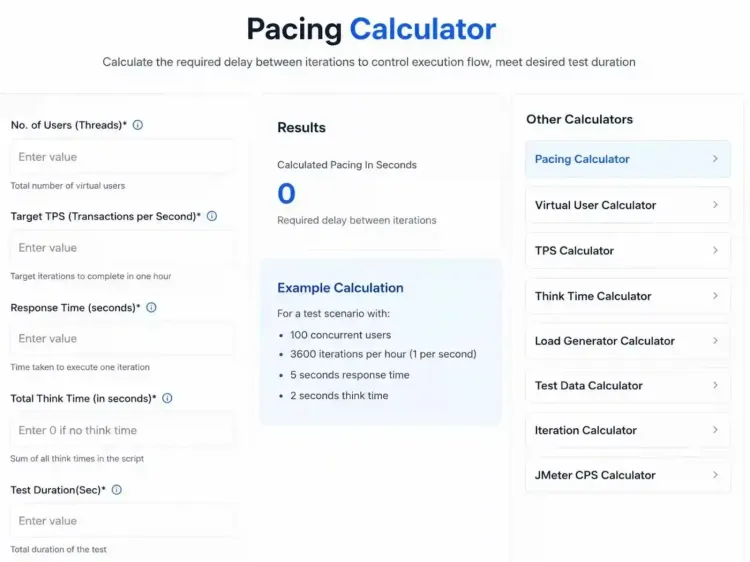
A pacing calculator helps determine the ideal delay between two iterations during a performance test. It uses inputs such as virtual users, target TPS, response time, think time, and test duration to calculate the pacing required for realistic workload simulation. This helps prevent excessive request rates and ensures your test accurately reflects real user behavior.
How to Calculate Pacing
- Enter the number of virtual users.
- Specify the target TPS or iterations.
- Add the average response time.
- Enter the total time.
- Provide the test duration.
- Click Calculate Pacing to get the recommended delay between iterations.
Example: Workload Modeling
An e-commerce website expects 9,000 orders per hour with 600 active users. During workload modeling, the performance tester finds that each iteration takes 90 seconds and the total think time is 110 seconds.
Input Values:
- Virtual Users: 600
- Response Time: 90 seconds
- Iterations per Hour: 9,000
- Think Time: 110 seconds
Formula to calculate pacing
= (Test Duration - Total Think Time - Script Execution Time) ÷ Number of Iterations
Result: The calculator recommends a 40-second pacing between iterations. This delay helps simulate realistic user behavior and ensures the application processes approximately 9,000 orders per hour with 600 concurrent users.
Calculate Pacing
TPS Calculator
What is a TPS calculator?
A TPS (Transactions Per Second) Calculator helps performance testers estimate the expected transaction throughput of an application during load testing. By using inputs such as virtual users, response time, transactions per iteration, pacing, and think time, it calculates both TPS (Transactions Per Second) and TPH (Transactions Per Hour).
These metrics are essential for workload modeling, capacity planning, and evaluating application performance under expected user traffic.
How to Calculate TPS
- Enter the number of concurrent users.
- Specify the average response time for one iteration.
- Enter the number of transactions in each iteration.
- Add the pacing value and total thinking time.
- Click Calculate TPS to view the estimated TPS and TPH.
Formula to calculate TPS:
TPS = (Virtual Users × Transactions per Iteration) / (Response Time + Think Time + Pacing)
Example: Workload Modeling
A web application needs to support 50 concurrent users executing a workflow with 3 transactions per iteration. The average response time is 10 seconds, with 30 seconds of think time and 60 seconds of pacing between iterations.
Input Values:
- Virtual Users: 50
- Response Time: 10 seconds
- Transactions per Iteration: 3
- Pacing: 60 seconds
- Think Time: 30 seconds
Result: The calculator estimates the expected Transactions Per Second (TPS) and Transactions Per Hour (TPH), helping teams validate workload models and assess whether the application can handle the expected traffic.
Calculate TPS
Iteration Calculator
What is an Iteration Calculator?
An Iteration Calculator helps performance testers estimate how many times a virtual user will execute a test script during a specified period. Based on virtual users, response time, pacing, and think time, it calculates the iterations per user per hour and the total iterations per hour. This is useful for workload modeling, capacity planning, and validating test scenarios.
How to Calculate Iterations
- Enter the number of concurrent users.
- Provide the average response time for one iteration.
- Enter the pacing value (0 if not applicable).
- Add the total think time.
- Click Calculate Iterations to estimate the total iterations per user and across the entire test.
Formula to calculate Iterations:
Iterations Per User Per Hour
Iterations/User = 3600 / (Response Time + Think Time + Pacing)
Total Iterations Per Hour
Total Iterations = Iterations/User × Virtual Users
Iterations Per User Per Hour
Iterations/User = 3600/(Response Time + Think Time + Pacing)
Total Iterations Per Hour
Total Iterations = Iterations/User × Virtual Users
Example of Iteration Calculator:
A video streaming platform expects 300 concurrent users during peak hours. Each user session takes 45 seconds, followed by 15 seconds of think time and 30 seconds of pacing before the next iteration.
Input Values:
- Virtual Users: 300
- Response Time: 45 seconds
- Pacing: 30 seconds
- Think Time: 15 seconds
Result: The calculator estimates the iterations per user per hour and the total iterations per hour, helping performance engineers build an accurate workload model and validate whether the platform can sustain the expected user activity.
Calculate Iterations
Linear Extrapolation Calculator
What is a Linear Extrapolation Calculator?
A Linear Extrapolation Calculator helps performance engineers estimate how an application may perform under higher workloads using existing performance test data. By extending a linear trend between two known data points, it predicts future values such as throughput, TPS, hits per second, or Java heap usage. This is especially useful when testing in a scaled-down environment where running production-level loads isn't feasible.
How to Calculate Linear Extrapolation
- Enter the first known data point (X1, Y1).
- Enter the second known data point (X2, Y2).
- Provide the target X value for which you want to estimate the result.
- Click Calculate to predict the corresponding Y value.
Formula to calculate extrapolation:
Y = Y₁ + ((X X − X₁) × (Y₂ − Y₁) / (X₂ − X₁))
Example: Capacity Planning
A performance team tests an application in a 50% scaled-down environment. At 500 virtual users, the system achieves 1,200 TPS, and at 1,000 virtual users, it reaches 2,400 TPS. The team wants to estimate the expected throughput at 1,500 users before running production-scale tests.
Input Values:
X1: 500 Y1: 1,200 TPS
X2: 1,000 Y2: 2,400 TPS
Target X: 1,500
Result: The calculator estimates the expected throughput (Y value) at 1,500 users, helping teams with capacity planning and performance forecasting.
Note: Linear extrapolation works best for metrics with a linear growth pattern, such as throughput, TPS, hits per second, and Java heap usage.
Calculate linear extrapolation.
Virtual User Calculator
What is a Virtual User Calculator?
A Virtual User Calculator helps performance testers estimate the number of virtual users (threads) required to generate a target workload. By using inputs such as target TPS, response time, think time, and pacing, it calculates the virtual users needed to accurately simulate real-world traffic. This is essential for workload modeling, capacity planning, and designing reliable performance tests.
How to Calculate Virtual Users
- Enter the target transactions per second (TPS).
- Provide the average response time for one transaction.
- Add the think time and pacing values (if applicable).
- Click Calculate Virtual Users to estimate the required user load.
Formula to Calculate Virtual Users:
Virtual Users = Target TPS × (Response Time + Think Time + Pacing)
Example: Workload Modeling
An online shopping platform expects to process 20 transactions per second during peak traffic. The average response time is 2 seconds, with 3 seconds of think time and 1 second of pacing between user actions.
- Input Values:
- Target TPS: 20
- Response Time: 2 seconds
- Think Time: 3 seconds
- Pacing: 1 second
Result: The calculator estimates the number of virtual users required to generate the target TPS, helping performance engineers create an accurate workload model and validate application scalability before production.
Calculate Virtual Users
Think Time Calculator
What is a Think Time Calculator?
A Think Time Calculator helps performance testers determine the ideal delay between user actions to simulate realistic user behavior during performance testing. Using inputs such as virtual users, response time, iterations per hour, pacing, and transactions per iteration, it calculates both the total think time and the fixed think time between transactions. This helps create accurate workload models and realistic load patterns.
How to Calculate Think Time
- Enter the number of concurrent users.
- Provide the end-to-end response time for one iteration.
- Enter the expected iterations per hour.
- Specify the pacing value and the number of transactions per iteration.
- Click Calculate Think Time to estimate the total and fixed think time values.
Formula to calculate Think Time:
- Total Think Time
- Total Think Time = Iteration Time − (Response Time + Pacing)
- Fixed Think Time
- Fixed Think Time = Total Think Time / (Number of Transactions − 1)
Example: Workload Modeling
A food delivery application expects 1,000 concurrent users, with each user placing 6 orders per hour. One iteration takes 30 seconds; each iteration includes 5 transactions, and users typically wait 10 minutes (600 seconds) before placing another order.
Input Values:
- Virtual Users: 1,000
- Response Time: 30 seconds
- Iterations per Hour: 6,000
- Pacing: 600 seconds
- Transactions per Iteration: 5
Result: The calculator estimates the total think time and the fixed think time between transactions, helping performance engineers build a realistic workload model that closely reflects actual user interactions.
Button: Calculate Think Time
Load Generator Calculator
What is a Load Generator Calculator?
A Load Generator Calculator helps performance testers estimate the number of load generator (LG) machines required to execute a performance test efficiently. Using memory consumption metrics and available system resources, it calculates the maximum number of virtual users a single load generator can support, and the total number of load generators needed. This helps with infrastructure planning, resource allocation, and accurate workload modeling.
How to Calculate Load Generators
- Enter the memory used by the first virtual user.
- Specify the memory used by each additional virtual user.
- Enter the total RAM available on the load generator.
- Provide the RAM used by the operating system.
- Enter the total number of virtual users required and click Calculate Load Generators.
Formula to Calculate Load Generator:
Maximum Users on One LG
Available RAM = Total RAM − OS RAM
Max Users = (Available RAM − First User Memory)/Additional User Memory + 1
Number of Load Generators
Required LG = Total Users / Max Users per LG
Example: Infrastructure Planning
A performance testing team plans to simulate 5,000 virtual users. Testing shows that the first virtual user consumes 15 MB of RAM, while each additional virtual user uses 12 MB. The load generator has 64 GB of RAM, with 16 GB reserved for the operating system.
Input Values:
- First VUser Memory: 15 MB
- Additional VUser Memory: 12 MB
- Total RAM: 65,536 MB
- OS RAM Usage: 16,384 MB
- Required Virtual Users: 5,000
Result: The calculator estimates the maximum virtual users per load generator and the number of load generators required, helping teams allocate the right infrastructure before executing large-scale performance tests.
Test Data Calculator
What is a Test Data Calculator?
A Test Data Calculator helps performance testers estimate the amount of unique test data required for a load test. By considering virtual users, response time, test data usage per iteration, and test duration, it calculates the number of records needed to avoid duplicating data usage, caching issues, and inaccurate test results. This is essential for workload modeling and preparing reliable performance test environments.
How to Calculate Test Data
- Enter the number of concurrent users.
- Provide the overall response time per iteration (including think time and pacing).
- Specify the number of test data occurrences in each iteration.
- Enter the total test duration.
- Click Calculate Test Data to estimate the required number of unique records.
Formula to Calculate Test Data:
Required Test Data = Virtual Users × (Test Duration / Overall Iteration Time) × Test Data Occurrence per Iteration
Example: Test Data Planning
A banking application plans to simulate 10,000 concurrent users during a 90-minute performance test. Each iteration takes 6 minutes (including response time, think time, and pacing), and 2 unique customer records are required for every iteration.
Input Values:
- Virtual Users: 10,000
- Overall Response Time: 6 minutes
- Test Data per Iteration: 2
- Test Duration: 90 minutes
Result: The calculator estimates the total number of unique test records required, helping performance engineers prepare sufficient test data and eliminate duplicate record usage during the test.
Proven at Scale: 1 Million API Requests in One Hour
See how our team successfully executed a large-scale performance test that processed 1 million API requests in just one hour, helping the client validate scalability, reliability, and system stability under heavy traffic.
JMeter CPS Calculator
What is a JMeter CPS Calculator?
A JMeter CPS (Characters Per Second) Calculator helps performance testers determine the CPS value required to achieve a target network bandwidth in Apache JMeter. The calculated value can be configured in the jmeter.properties file using the httpclient.socket.http.cps or httpclient.socket.https.cps property. This enables realistic bandwidth simulation for protocol-level performance tests such as HTTP, HTTPS, TCP, and MQTT.
How to Calculate JMeter CPS
- Enter the target bandwidth in kbps (kilobits per second).
- Click Calculate CPS.
- Copy the calculated CPS value.
- Configure the value in the jmeter.properties file to simulate the required network bandwidth during test execution.
Formula to calculate JMeter CPS:
CPS = (Target Bandwidth × 1024) / 8
or
CPS = Bandwidth(kbps) × 128
Example: Bandwidth Simulation
A performance testing team wants to simulate a 2 Mbps (2,048 kbps) network connection while testing an API in Apache JMeter. To accurately throttle the connection, they need to calculate the appropriate Characters Per Second (CPS) value.
Input Value:
Target Bandwidth: 2,048 kbps
Result: The calculator generates the recommended CPS value, which can be added to the JMeter configuration to accurately simulate the desired network bandwidth and create more realistic performance test scenarios.
GC Time Ratio Calculator
What is a GC Time Ratio Calculator?
A GC Time Ratio Calculator helps Java performance engineers measure how much time the JVM spends performing garbage collection (GC) compared to executing application code. By analyzing GC time and total execution time, it calculates the GC time ratio and GC time percentage, helping identify memory bottlenecks and optimize JVM performance. These insights are useful for tuning Java applications and configuring the -XX:GCTimeRatio JVM parameter.
How to Calculate GC Time Ratio
- Enter the total time spent on garbage collection.
- Enter the application's total execution time.
- Click Calculate GC Time Ratio to view the GC Time Ratio and GC Time Percentage.
Formula to calculate GC Time Ratio:
GC Time Ratio
GC Time Ratio = GC Time / (Total Execution Time − GC Time)
GC Percentage
GC % = (GC Time / Total Execution Time) ×100
Example: JVM Performance Analysis
A Java-based application runs for 1,000 seconds, during which the JVM spends 100 seconds performing garbage collection. The engineering team wants to evaluate GC overhead and determine whether JVM tuning is required.
Input Values:
GC Time: 100 seconds
Total Execution Time: 1,000 seconds
Result: The calculator displays the GC Time Ratio and GC Time Percentage, helping performance engineers assess application throughput, identify excessive garbage collection, and optimize JVM settings for improved performance.
Ready to Build More Accurate Performance Tests?
Whether you're estimating virtual users, calculating TPS, planning test data, or sizing load generators, Baseline11 provides the tools you need to prepare reliable and realistic performance tests. Explore our free performance calculators or discover how Baseline11 helps teams execute scalable, cloud-native load testing with confidence.