



AR/VR testing plays a critical role in building high-quality Augmented Reality (AR) and Virtual Reality (VR) applications. As these technologies continue to grow in popularity, it becomes increasingly important to ensure that experiences are smooth, reliable, and user-friendly.
This type of testing uses a range of methods and tools to assess performance, usability, and compatibility across devices and platforms, helping to deliver seamless and immersive experiences for users.
Now, imagine a surgeon practicing a life-saving operation inside a virtual operating room before ever touching a real patient, or a customer virtually placing a sofa in their living room before buying it online. These are not future possibilities; they are happening right now. But what happens when the AR overlay drifts, the VR frame rate drops, or the simulation crashes in mid-session?
That is precisely why AR/VR testing exists.
As augmented reality and virtual reality move from novelty to necessity across healthcare, education, gaming, real estate, and retail, the cost of a buggy experience is no longer just a negative review; it can be a safety risk. An augmented reality test validates that digital content blends correctly with the real world, while VR testing ensures fully immersive environments perform without causing discomfort or failure.
In this complete guide, you will learn what AR/VR testing is, why it matters, the types of testing involved, real-world use cases, test strategies, tools, and the key challenges every tester must overcome.
Key Takeaways
- AR overlays digital content on the real world; VR creates fully digital environments, and both require specialized testing.
- AR/VR testing covers functionality, usability, performance, compatibility, security, and integration testing.
- Unique challenges include hardware diversity, environment variability, motion sickness, and automation limitations.
- Tools like Unity Test Framework, Oculus Performance HUD, and AWS Device Farm are widely used.
- Thorough AR/VR testing is critical for user safety, immersion quality, and successful platform certification.
What is Augmented Reality (AR)?
Augmented Reality (AR) is the integration of digital information, such as visuals, sounds, or other sensory data, into a user's real-world environment in real time. Unlike VR, which replaces reality entirely, AR enhances it. Users experience their real surroundings with digital layers placed on top, typically through a smartphone camera or AR-enabled glasses like Microsoft HoloLens.
AR Applications Across Industries
| Industry | AR Use Case |
|---|---|
| Medical Training | Simulating real-life surgical scenarios for hands-on practice |
| Interior Design | Navigating and manipulating 3D models of spaces before construction |
| Education | Creating interactive, immersive learning experiences in classrooms |
| Entertainment | Enhancing gaming and immersive media experiences |
| Tourism | Letting users explore destinations virtually without physical travel |
| Retail / E-Commerce | Virtual try-ons for clothes, shoes, and furniture |
AR works by recognizing real-world markers or surfaces and anchoring digital objects to them in real time. This scenario makes augmented reality testing uniquely challenging; the app must work correctly in an infinite variety of real-world lighting conditions, spaces, and surfaces.
What is Virtual Reality (VR)?
Virtual Reality (VR) is a fully computer-generated environment that immerses users as if they were physically inside it. Users experience VR through headsets like Meta Quest 3, PlayStation VR2, or HTC Vive, which track head and body movements and update the visual environment accordingly.
VR goes beyond entertainment; it is being used for surgical training, military simulations, architecture walkthroughs, and phobia therapy.
VR Applications Across Industries
| Industry | VR Use Case |
|---|---|
| Gaming & Entertainment | Immersive game worlds and interactive experiences |
| Education | Virtual classrooms and interactive learning simulations |
| Medical Training | Surgical practice and patient care simulations |
| Architecture & Real Estate | 3D walkthroughs of properties before construction |
| E-Commerce | Virtual showrooms and product demos |
| Mental Health | Exposure therapy for phobias and PTSD treatment |
What is AR/VR Testing?
AR/VR testing is the systematic process of evaluating augmented reality and virtual reality applications to ensure they deliver full-stack functionality, compatibility, reliability, usability, security, and performance.
Given the immersive nature of AR/VR experiences, testing these applications involves unique challenges and methodologies compared to traditional software testing. Users of poorly tested AR/VR apps can experience:
- Motion sickness and nausea – from inconsistent frame rates or poor locomotion design
- Eye strain – from improper display calibration or excessive blue light
- Disorientation – from tracking failures or inconsistent spatial audio
- Seizure risks – from flashing visuals at certain frequencies
These health implications make AR/VR testing not just a quality concern but a safety requirement.
AR vs VR Testing: Key Differences
| Aspect | AR Testing | VR Testing |
|---|---|---|
| Environment | Real world + digital overlay | Fully digital environment |
| Primary Devices | Smartphones, AR glasses | Headsets (Meta Quest, PSVR2) |
| Key Concern | Anchor stability, real-world alignment | Frame rate, motion sickness |
| Lighting Dependency | High, real lighting affects AR quality | Low, lighting is controlled |
| Performance Target | 30–60 FPS (mobile AR) | 72–120 FPS (VR headsets) |
| Automation Difficulty | Moderate | High |
Different Types of Testing in AR/VR Testing
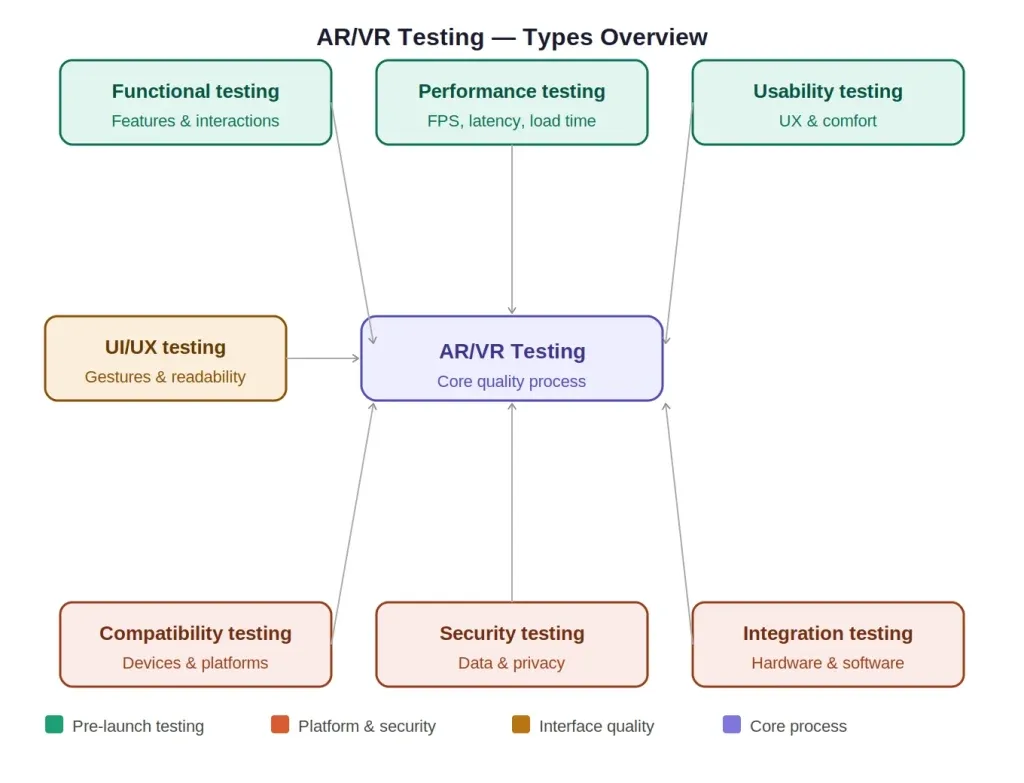
1. UI/UX Testing
UI/UX testing in AR/VR evaluates how intuitive and comfortable the interface is for users in a 3D spatial environment. Unlike flat-screen UI testing, testers must evaluate the following:
- Gesture controls — are they responsive and natural?
- Text readability — is text legible at headset viewing distances?
- Spatial UI placement — are interactive elements within a comfortable reach?
- Visual comfort — do colors, contrasts, and brightness suit extended use?
Key tools: Lookback, UserZoom, in-session video recording.
2. Functional Testing
Functional testing verifies that all features of the AR/VR application work exactly as designed:
- Do virtual objects respond correctly to user interactions?
- Is gesture and voice input correctly detected?
- Do game mechanics, navigation flows, and simulation logic work as expected?
- Does the AR marker recognition trigger the correct digital overlay?
Example: In a VR surgical training app, functional testing verifies that selecting a scalpel tool activates the correct incision animation with proper physics behavior.
AR/VR apps require both functional and non-functional testing: functional to verify features work correctly and non-functional to ensure the experience is smooth, safe, and performant.
3. Usability Testing
Usability testing evaluates the overall user experience within the AR/VR environment. This typically involves real users:
- Assessing ease of use for first-time users
- Identifying confusing interaction patterns
- Collecting comfort feedback after extended sessions
- Using standardized tools like the System Usability Scale (SUS) and Simulator Sickness Questionnaire (SSQ)
Usability testing is especially important for enterprise AR/VR (used by non-technical staff) and healthcare applications.
4. Performance Testing
Performance is the backbone of any quality AR/VR experience. Key metrics to test:
| Metric | Target Value |
|---|---|
| Frame Rate (VR) | 72–120 FPS |
| Frame Rate (Mobile AR) | 30–60 FPS |
| Motion-to-Photon Latency | Under 20ms |
| Load Time | Under 5 seconds |
| CPU Usage | Below 80% sustained |
| GPU Temperature | Within safe operating range |
Tools: Unity Profiler, Oculus Performance HUD, SteamVR Frame Timing, Xcode Instruments (iOS), Android GPU Inspector.
Tracking the right key performance metrics, from FPS to motion-to-photon latency, is essential before you can define pass/fail criteria for any AR/VR application.
5. Compatibility Testing
Compatibility testing ensures the AR/VR app works correctly across:
- VR Headsets: Meta Quest 2/3, HTC Vive Pro, PlayStation VR2, Apple Vision Pro
- Mobile AR: iOS (ARKit) vs Android (ARCore): Each has different feature sets
- OS Versions: Android 12–15, iOS 16–18, Windows 10/11
- Accessories: Various controller models, haptic devices, external cameras
- Network conditions: WiFi, 5G, and offline modes for standalone VR
Each device has different specs, refresh rates, and sensor capabilities, which is why compatibility testing is one of the most overlooked yet critical steps in AR/VR QA.
6. Security Testing
Security testing for AR/VR applications covers:
- Data encryption — is user data encrypted in transit and at rest?
- Authentication — are login and session mechanisms secure?
- Biometric data protection — eye tracking and gesture data must be handled with care
- Permission management — does the app request only necessary device permissions?
- Compliance — does the app meet GDPR, CCPA, and HIPAA (for medical apps) requirements?
7. Integration Testing
Integration testing confirms that all components of the AR/VR system work together correctly:
- Hardware + software integration (headset + app + backend server)
- Data exchange between AR overlays and real-time data feeds
- Third-party SDK integrations (mapping services, payment gateways, analytics)
- Multiplayer synchronization in VR social platforms
Challenges in AR/VR Testing
AR/VR testing is significantly more complex than testing traditional web or mobile apps. Here are the major challenges testers face:
1. Complex Hardware and Software Integration
Testing AR/VR applications require working with VR headsets, motion sensors, depth cameras, haptic controllers, and AR glasses. Each device has its own specifications, capabilities, and limitations. Ensuring hardware compatibility across all supported platforms, like Meta, Meta Quest, HTC Vive, HoloLens, and Apple Vision Pro, demands extensive device-specific testing.
2. Environment Variability
Real-world AR applications must work in every conceivable physical environment, from bright outdoor spaces, dim offices, cluttered rooms, and shiny floors. Variations in:
- Lighting conditions (sunlight, artificial light, shadows)
- Surface textures (reflective, transparent, patterned)
- Room dimensions (small rooms vs open spaces)
…all affect object recognition and tracking accuracy. Replicating all of these in a test lab is nearly impossible.
3. Performance Optimization
AR/VR apps are resource intensive. They require:
- High-end graphics rendering in real time
- Low-latency sensor data processing
- Consistent frame rates (dropping below 72 FPS in VR can cause immediate nausea)
Ensuring smooth performance across all supported devices, from flagship smartphones to mid-range headsets, without sacrificing visual quality is a constant challenge.
Understanding the different [types of performance testing helps AR/VR teams choose the right approach, whether it is load testing the server backend or stress testing the rendering engine under peak conditions.
4. Motion Sickness Is Subjective
There is no universal threshold for motion sickness. Some users experience discomfort at 72 FPS; others are fine at 60 FPS. Such variability makes it difficult to define clear pass/fail criteria and requires testing with diverse user groups.
5. Security and Privacy
AR/VR apps often collect sensitive data:
- Biometric data (eye tracking, hand gestures)
- Real-world scans (room mapping, facial recognition)
- Behavioral data (movement patterns, interaction history)
Protecting this data requires thorough security testing aligned with regulations like GDPR and CCPA.
6. Automation Limitations
Most testing automation frameworks are built for 2D interfaces. VR environments involve gaze-based interaction, 6DOF controller input, and spatial navigation, areas where traditional tools like Selenium or standard Appium fall short.
Test Strategy for AR/VR Applications
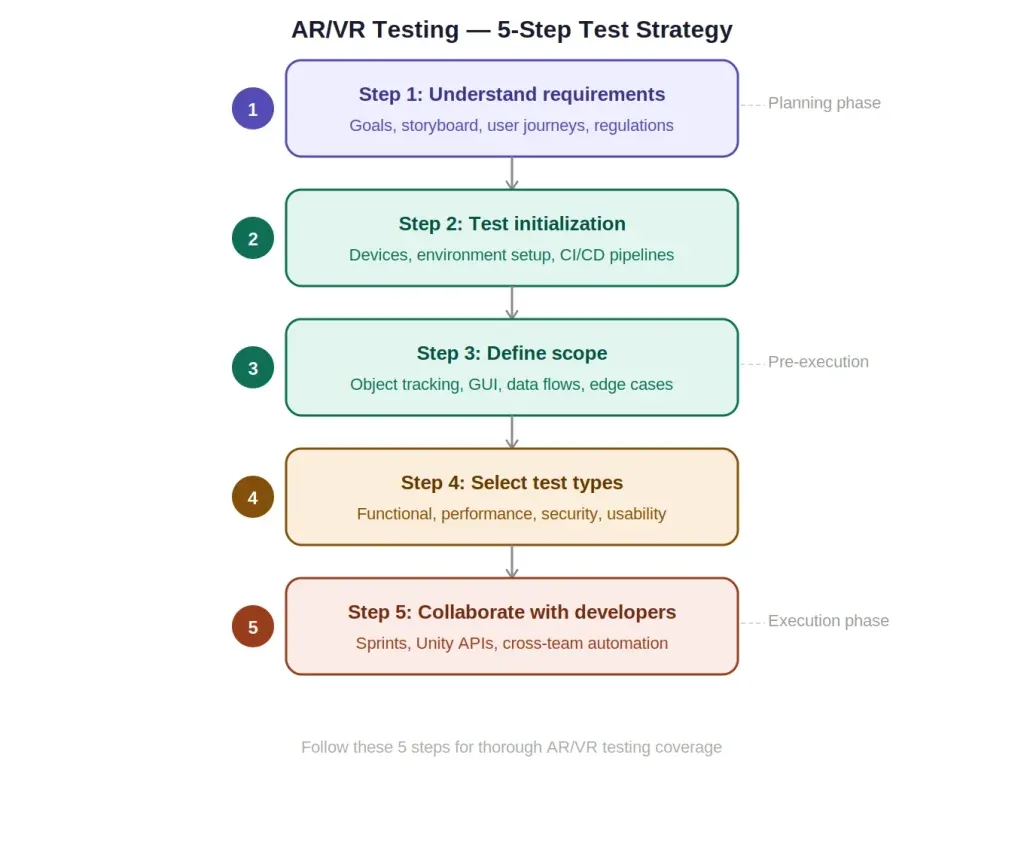
A structured test strategy is essential for thorough AR/VR testing. Follow these five steps:
Step 1: Understand the Requirements
Before writing a single test case, deeply understand what the application is supposed to do. This includes:
- Defining the goal and purpose of the AR/VR experience
- Creating a storyboard that maps out all potential user journeys
- Identifying target devices, platforms, and user demographics
- Understanding industry regulations that apply (e.g., medical device standards for VR training apps)
Step 2: Test Initialization and Environment Setup
- Identify all target devices (headsets, smartphones, AR glasses)
- Set up the test environment, both physical (testing room) and virtual (emulators, simulators)
- Define the test infrastructure: CI/CD pipelines, device farms, performance monitoring tools
- Prepare test data and scenarios
Step 3: Define the Scope of Testing
Clearly define what will and will not be tested. For AR/VR this typically includes:
- Object tracking accuracy (2D/3D object registration)
- Multi-input performance (gesture, voice, controller)
- GUI testing for in-headset menus and overlays
- Whether the AR/VR model connects correctly to backend data sources
- Platform-specific behaviors and edge cases
Step 4: Decide the Types of Testing to Perform
Based on the project requirements, select the appropriate mix of:
- Functional testing
- Usability testing
- Performance testing
- Compatibility testing
- Security testing
- Integration testing
- Immersive/comfort testing
Tailor your test types based on the industry; a medical VR simulation requires far stricter safety and accuracy testing than a casual AR game.
Step 5: Collaborate Closely with Developers
AR/VR testing is not a siloed activity. Testers should:
- Participate in sprint planning and design reviews
- Work directly with developers who understand the hardware APIs
- Use shared tools like Unity Test Framework for cross-team test automation
- Learn the basics of Unity or Unreal Engine to understand what is being tested
Got a project in mind? We'd love to hear it.
We work with mid-size teams who are serious about quality. Tell us where you are, what you're building, and what's slowing you down, we'll figure out the rest together.
Contact Us for Expert QA Support
Best Tools for AR/VR Testing in 2026
| Tool | Best For | Platform |
|---|---|---|
| Unity Test Framework | Automated functional and unit testing | Unity-based AR/VR apps |
| Appium | Mobile AR app testing | Android / iOS |
| TestComplete | UI and functional automation | Multi-platform |
| Oculus Performance HUD | Real-time VR performance monitoring | Meta Quest |
| Steam VR Frame Timing | Frame rate and latency analysis | PC VR |
| AWS Device Farm | Cloud-based device compatibility testing | ARCore / ARKit |
| Xcode Instruments | iOS AR performance profiling | Apple ARKit |
| Android GPU Inspector | GPU performance testing | ARCore |
| Lookback | Remote usability testing sessions | Multi-platform |
AR/VR Use Case: Osso VR (Medical Training)
Osso VR is a leading example of VR in a high-stakes industry. It allows surgeons and medical students to practice complex procedures inside a photorealistic virtual operating room.
Why Testing Matters Here
| Benefit | Testing Requirement |
|---|---|
| Risk-Free Practice | Functional accuracy of every surgical tool must be verified |
| Cost-Effective Training | App must run reliably on all supported hospital-deployed headsets |
| Skill Assessment | Performance tracking and tracking logic must be tested for accuracy |
| Patient Safety | Any simulation bug could translate into incorrect real-world technique |
In this context, VR testing is not optional; it is a patient's safety obligation.
Sample Test Scenario for AR/VR Testing
Scenario: Testing an AR Navigation App
Objective: Ensure the AR app accurately overlays navigation directions onto the real-world environment.
Pre-conditions:
- App installed on a supported Android/iOS device
- Device sensors (GPS, camera, gyroscope) calibrated
- Test environment defined (office building or outdoor park)
| Step | Action | Expected Result |
|---|---|---|
| 1. Setup | Open the AR navigation app | App launches without errors |
| 2. Destination | Select a destination within the test area | Route calculated and displayed |
| 3. AR Display | Begin navigation; observe AR overlays | Directional arrows and markers appear correctly anchored |
| 4. Accuracy | Walk the route; observe real-time updates | Overlays update correctly at each turn |
| 5. Edge Cases | Test in low light and high sunlight | Overlays remain visible and stable |
| 6. Usability | Ask a first-time user to complete navigation | User completes route without assistance |
| 7. Performance | Monitor FPS and battery during 10-min session | FPS stays above 30; battery drain is acceptable |
Pass Criteria: All overlays are accurately positioned, updated in real time, remain stable in varied lighting, and the route is completable by a new user without instruction.
Conclusion
AR and VR technologies are no longer niche; they are reshaping how we learn, work, heal, and play. But the quality of these experiences depends entirely on how well they are tested.
AR/VR testing is a specialized discipline that addresses unique challenges: hardware diversity, environment variability, motion sickness, security, and automation limitations.
Whether you are running an augmented reality test on a retail shopping app, performing full VR testing on a medical simulation, or validating a VR game before platform submission, the principles remain the same: test early, test often, and always test with real users and real devices.
The future of immersive technology is only as strong as the quality assurance behind it, and the fundamentals covered in this guide are the foundation every AR/VR tester needs.