


Imagine opening your favorite app during peak hours and everything just works. No spinning loaders. No lag. No frustration.
That kind of smooth experience doesn't happen by accident. Behind the scenes, teams are continuously validating performance as the software evolves. This is where Continuous Performance Testing (CPT) comes in.
In today's always-on digital world, performance isn't a "final checklist item." It's an ongoing commitment, and CPT is how modern teams keep applications fast, stable, and scalable at all times.
Let's break it down in a simple, practical way.
Need help with performance?
Our new automation tools ensure your app stays lightning fast
Find out howWhat Is Continuous Performance Testing?
Continuous performance testing is the practice of evaluating application speed, stability, and scalability throughout the entire development lifecycle, not just before release.
Instead of waiting until the end to test performance, CPT runs alongside development, often integrated directly into CI/CD pipelines. Every meaningful code change gets validated, so teams immediately see how performance is affected.
Think of it as moving from:
"Test performance before release."
to
"Always know how the system performs."
This shift turns performance testing from a reactive activity into a proactive quality safeguard.
Why Continuous Performance Testing Matters
User expectations have never been higher. Whether it's a banking app, healthcare platform, or streaming service, slow performance equals lost trust.
With CPT, teams can:
- Detect performance issues early, before users feel them
- Prevent slowdowns caused by new features or infrastructure changes
- Make smarter decisions based on real performance data
- Maintain consistent user experience across releases
In short: fewer surprises in production, happier users, and more confident releases.
Real-World Impact (With Metrics)
After introducing CPT into CI pipelines, one enterprise e-commerce platform saw:
| Metric | Before CPT | After CPT |
|---|---|---|
| P95 API response time | 780ms | 450ms |
| Production incidents/month | 6 | 1 |
| Performance-related rollbacks | Frequent | Rare |
| Release confidence | Low | High |
Performance Issues Cost Users. We Help You Prevent Them.
From load and stress testing to continuous performance validation, we ensure your application performs under real-world conditions.
Talk to a Performance Testing Expert
Continuous vs Traditional Performance Testing
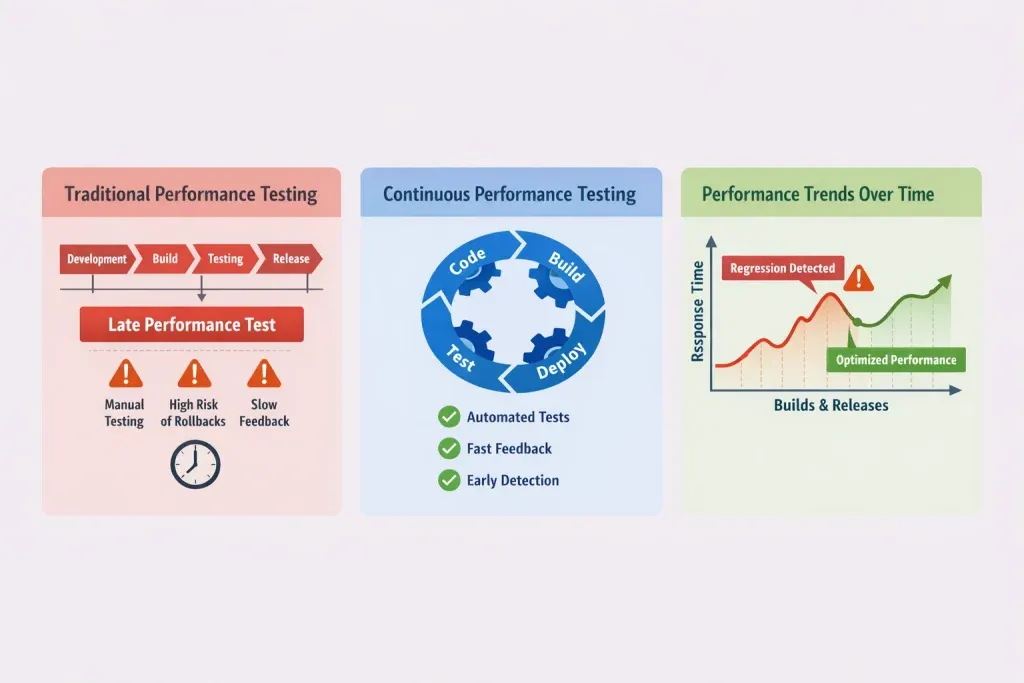
Traditional performance testing usually happens:
- At specific milestones
- Near the end of development
- Before a major release
While this still has value, it doesn't fit well with fast-paced Agile and DevOps environments.
Continuous performance testing, on the other hand:
- Runs throughout the lifecycle
- Is triggered by code changes
- Integrates with CI/CD pipelines
- Tracks performance trends over time
Instead of asking, "Does it perform well right now?", CPT answers:
"Is performance improving or slowly degrading over time?"
That insight is a game changer.
Types of Continuous Performance Tests Used in CPT
Continuous performance testing doesn't rely on just one type of test. A strong strategy combines several:
- Load Testing – Validates how the system performs under expected user load
- Stress Testing – Pushes the system beyond limits to find breaking points
- Endurance (Soak) Testing – Detects issues like memory leaks over long runs
- Spike Testing – Measures behavior during sudden traffic spikes
- Scalability Testing – Evaluates how well the system scales with added resources
- Network/Throttle Testing – Simulates slow or unstable network conditions
While automation powers CPT, manual performance analysis still plays an important role, especially when understanding real user behavior before scripting tests.
Key Performance Testing Domains
Continuous performance testing applies across multiple areas:
- Web Applications – Page load time, concurrency, backend response
- Mobile Applications – Device constraints, network variability
- APIs & Microservices – Latency, throughput, reliability
- Client-Side Performance – Rendering time, frontend bottlenecks
A strong CPT setup covers end-to-end user journeys, not just isolated components.
Performance Testing Tools: What Should You Use?
Performance testing tools generally fall into two categories:
Open-Source Tools
- Highly flexible
- Strong community support
- Cost-effective
- Ideal for teams comfortable with customization
Commercial Tools
- Advanced features
- Enterprise-level support
- Easier setup for complex environments
The "best" tool depends on:
- Your application architecture
- CI/CD maturity
- Team skillset
- Budget and scalability needs
The goal isn't tooling; it's actionable performance insights.
Automated Continuous Performance Testing
Automation enables CPT to scale.
By automating:
- Test execution
- Load generation
- Result collection
- Trend analysis
Teams can run performance checks frequently without slowing development.
That said, automation doesn't replace human judgment. Major releases and architectural changes still benefit from deeper analysis and exploratory performance testing.
Example: JMeter Integrated into Jenkins
What this achieves:
- Automated load testing on every build
- HTML performance reports
- Pipeline fails if SLAs are breached
Enforcing Performance Thresholds (P95-Based)
Instead of failing builds on averages, this blocks releases when P95 response time exceeds 800ms, far closer to real user experience.
Challenges in Continuous Performance Testing (And Real Solutions)
| Challenge | What Actually Works |
|---|---|
| Too many tests | Use a performance pyramid |
| False positives | Baseline comparison + percentiles |
| Slow pipelines | Smoke tests on PRs, full tests nightly |
| Changing features | Version test scripts with code |
| Infra noise | Isolated or containerized environments |
CPT succeeds when it's focused and intentional, not excessive.
Best Practices for Sustainable CPT
- Synthetic load generation
- Resiliency and chaos testing
- Script versioning
- Environmental reproducibility
- Clear, developer-friendly reports
- Strong observability integration
These practices transform CPT from "extra testing" into engineering leverage.
Final Thoughts
Continuous performance testing isn't just about tools or automation; it's about building confidence in every release.
When performance is continuously validated:
- Teams move faster
- Users stay happy
- Systems scale reliably
- Businesses avoid costly failures
If your goal is to deliver fast, stable, and scalable software in 2026 and beyond, CPT isn't optional; it's essential.