


Every QA team dreams of flawless automation that includes fast tests, zero flakiness, and instant reports.
But reality? Many automation efforts stall before they show real value.
In fact, according to SAGE Journals, less than 10% of organizations achieve more than 80% ROI from their automation investments. The reason isn’t the lack of tools; it’s the lack of a clear automation strategy.
Too often, teams jump straight into frameworks and tool setups without asking the right questions:
- What are we automating and why?
- How does this support release velocity or business goals?
- Who owns the maintenance when things break?
Without a roadmap, automation turns into chaos; scripts break, coverage drops, and ROI disappears.
The solution? A test automation strategy that connects the dots between tools, people, and process.
This guide will help you build one. You’ll learn how to define your goals, choose the right frameworks, measure ROI, and keep your automation future-ready with emerging trends like AI and self-healing tests.
By the end, you won’t just “do automation.”
You’ll have a strategy that scales with your product and delivers measurable results with every release.
What Is a Test Automation Strategy?
A test automation strategy is your blueprint for bringing automation into the testing process. It defines what to automate, which tools and frameworks to use, and how to plan, execute, and analyze your tests.
With a clear strategy in place, your automation efforts stay aligned with development goals and lead to higher software quality and greater efficiency.
When thoughtfully designed, a test automation strategy doesn’t just make testing faster, it minimizes risks, ensures consistency across releases, and keeps your QA process running like a well-tuned machine.
Test Automation Strategy vs Framework: Key Differences
When it comes to automation, strategy and framework often get used interchangeably, but they serve very different purposes.
Understanding this distinction is what separates a short-term automation setup from a long-term, scalable solution.
What Is Test Automation Framework?
A test automation framework is the technical backbone of your automation setup.
It defines the structure, rules, and reusable components that make test scripts consistent, maintainable, and scalable.
In simpler terms, a framework is your execution engine; it’s how you organize test cases, manage data, and control how tests are run.
Common Examples Include
- Data-driven frameworks – separate test data from logic for flexibility
- Keyword-driven frameworks – use high-level keywords to make tests readable and reusable
- Behavior-driven (BDD) – use natural language syntax (like Given–When–Then) to improve collaboration
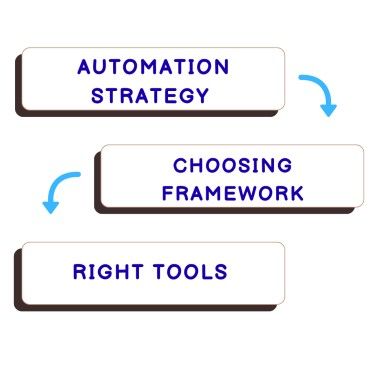
Automation testing strategy framework and tools.
A well-built framework ensures efficiency and uniformity, but it’s still just a part of your larger automation strategy.
Why Strategy Comes Before Framework
Many teams make the mistake of jumping straight into building a framework or choosing tools before defining their strategy.
The result? Technical complexity, scattered scripts, and automation that doesn’t align with project goals.
A well-defined test automation strategy helps you:
- Identify what actually needs automation (not everything should be)
- Set clear objectives for coverage, performance, and ROI
- Choose the right framework and tools that fit your goals
- Plan for scalability and maintenance from day one
In short, the strategy gives purpose to your framework.
Without it, even the most sophisticated setup can become another “failed automation project.”
To see how this plays out in the real world, let’s look at one example.
How Strategy Drove Framework Success
One of our retail clients initially focused on tool selection before defining a clear automation strategy.
Their regression cycles stretched up to 5 days per release, slowing down CI/CD delivery and draining team productivity.
When we stepped in, the approach shifted: instead of starting with tools, we began with strategy.
The team identified high-priority workflows, outlined clear ROI metrics, and aligned automation goals with business needs.
Here’s What Changed
- Adopted a framework-driven automation strategy using Selenium
- Integrated it into Jenkins for continuous execution
- Introduced API-level testing to catch issues earlier in the cycle
The Results
- Regression time reduced by 60%
- Test stability improved by 40%
- Releases became faster without compromising quality
Core Components of a Successful Automated Testing Strategy
A winning automated testing strategy isn’t built overnight; it’s the result of a clear plan, the right tools, and a structured approach that keeps your testing aligned with development goals.
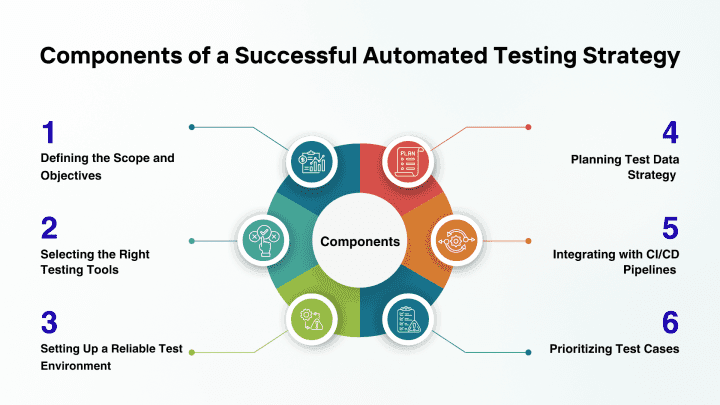
Components of automation testing strategy.
Let’s explore the essential components that shape a robust automation testing approach and ensure quality at every stage of the delivery pipeline.
1. Defining the Scope and Objectives
Before diving into automation, it’s crucial to define the why and what behind your efforts.
Start by mapping out which areas of your application will benefit most from automation, such as regression tests, smoke tests, and high-traffic workflows that demand repetitive validation.
A Strong Automation Strategy Begins With
- Focused Scope: Identify features, integrations, and test types to automate first
- Measurable Goals: Set KPIs such as reduced test cycle time, improved coverage, or faster release velocity
- Balanced Approach: Keep manual testing reserved for exploratory testing and edge cases that require human insight
A clearly defined scope ensures your automation delivers measurable ROI and aligns with your overall QA goals.
2. Selecting the Right Testing Tools
Your tools form the backbone of your automation success.
Choose platforms that integrate well with your existing tech stack and support the programming languages your team is comfortable with. For instance, if your QA engineers prefer Python, go for frameworks like Pytest or Robot Framework instead of purely JavaScript-based ones.
When Evaluating Tools
- Check cross-platform compatibility and CI/CD integration support
- Prioritize ease of onboarding and maintenance
- Balance scalability with cost efficiency
The right set of tools ensures your testing strategy is both practical and future ready.
3. Setting Up a Reliable Test Environment
A stable and consistent test environment is essential for dependable results.
Your environment should mimic production as closely as possible to avoid false positives and deployment surprises.
Here’s How to Strengthen Your Setup
- Standardize configurations across operating systems, browsers, and network layers
- Automate provisioning using Infrastructure as Code (IaC) tools to reduce setup time
- Isolate test data to protect sensitive information and maintain accuracy
- Integrate with CI/CD pipelines for continuous execution and feedback
A well-structured environment ensures that every automated test runs under predictable and reliable conditions, a cornerstone of best practices for automation testing.
4. Planning Test Data Strategy
No automation is effective without relevant and realistic data.
Defining test data requirements early helps avoid flaky tests and inconsistent results
Include both static and dynamic datasets to simulate real-world conditions.
Follow These Data Best Practices
- Use mocking or stubbing to simulate external dependencies
- Apply data masking or anonymization for sensitive information
- Reuse or auto-generate data where possible to reduce maintenance overhead
A thoughtful test data plan improves efficiency, reduces manual setup, and boosts the accuracy of your automated test strategy.
5. Integrating with CI/CD Pipelines
Continuous integration and delivery (CI/CD) play a key role in modern automation strategies.
By embedding tests into the CI/CD process, you ensure that quality checks run automatically with every build, merge, or deployment.
Benefits Include
- Faster feedback on code stability and performance
- Reduced defect leakage to production
- Streamlined release cycles aligned with agile and DevOps workflows
This approach transforms testing into a continuous, proactive process, not a last-minute step before release.
6. Prioritizing Test Cases
Automation works best when focused on high-impact areas.
Prioritize tests that are repetitive, time-consuming, and business-critical.
For example, start with core user journeys or backend processes that frequently change.
Use a Test Management Platform To:
- Organize test suites by priority
- Track coverage and outcomes
- Align test plans with product milestones
This ensures that your testing efforts are strategic, efficient, and value-driven, not scattered or redundant.
Step-by-Step Guide to Build an Effective Test Automation Strategy
Creating an automation strategy from scratch can feel complex. Here’s a simple, structured process your QA team can follow to make it more manageable.
1. Prioritize Critical Tests
It’s tempting to automate every manual test, but that’s rarely efficient. The smarter move is to start with high-impact test cases that affect core business functions.
Focus on areas like regression testing for critical workflows, API and integration tests, or smoke tests that validate builds. These deliver the most value early on and help teams demonstrate quick wins.
Some tests, like exploratory or usability testing, still need human intuition and shouldn’t be automated. By targeting the right areas first, teams can reduce testing time, maintain quality, and achieve faster feedback cycles.
2. Identify Risks and Limitations
Risk analysis is at the heart of any effective automation strategy. It helps you focus on testing efforts where failures would have the most serious business impact. :
Start by listing potential risks and estimating the likelihood of each one occurring. Then, assess the severity of their impact using a consistent scale, such as low, medium, or high.
Here’s a Simple Way to Approach It
- Define impact criteria: Establish clear metrics for how risks affect project goals
- Identify scenarios: Think through possible outcomes for each risk
- Quantify and prioritize: Measure the potential impact, note dependencies, and rank risks based on severity
- Consult stakeholders: Gather input from QA, DevOps, and business teams to ensure all perspectives are covered
- Maintain a risk register: Document findings and update them regularly as projects evolve
By prioritizing high-impact, high-probability risks first, teams can optimize testing efforts, strengthen product stability, and prevent costly issues before they reach production.
3. Pick the Right Automation Tools and Frameworks
Choosing the right automation tools goes beyond pricing. Evaluate how well each option fits your team’s skills, tech stack, and project goals. Look for tools that are easy to learn, integrate seamlessly, and scale with your needs.
For mobile testing, ensure support across iOS and Android. You can either use platform-specific tools like UI Automation (iOS) and Robotium (Android), or cross-platform solutions like Appium and Selenium.
The goal is simple, select tools that make automation smoother, not more complex.
4. Verify Your Test Data
Reliable test data is critical for accurate results. Validate your data after each release to catch inconsistencies early and avoid rerunning tests unnecessarily
Automate data loading, cleanup, and updates to keep test environments consistent. Use techniques like data masking or anonymization when working with production-like data to maintain security and accuracy.
5. Integrate Security with DevSecOps
Security should be built into your automation process, not added later. Embed DevSecOps principles by securing your code storage, managing deployment permissions, and setting up continuous vulnerability scans.
Regularly review dependencies, especially when using open-source automation servers like Jenkins, to prevent potential risks.
6. Group and Tag Your Tests
Organizing tests through tagging improves traceability and reduces confusion. Assign descriptive tags based on functionality or test type, for example, login, checkout, or smoke tests.
This structure helps teams quickly identify which tests to run, when to run them, and how to maintain consistency as your suite grows.
7. Optimize for Efficiency
Look for repetitive testing patterns and eliminate redundancy. If the same functionality is covered by multiple test types (manual, unit, automated), consolidate to save time and effort.
Reusable scripts and shared libraries streamline maintenance and boost long-term productivity.
8. Use Agile and DevOps Tools
Adopt Agile and DevOps tools like Jira or integrated CI/CD systems to keep your automation efforts adaptive and transparent.
Document objectives, frameworks, and tool choices so you can easily adjust after each sprint. This turns your testing plan into a living document that evolves with your project.
9. Design and Run Your Tests
Once your plan and tools are ready, it’s time to execute. Follow best practices like Behavior-Driven Development (BDD), Page Object Patterns, and data-driven testing for maintainable scripts.
Run tests in parallel to speed up execution and set up clear reporting dashboards for real-time insights. A well-structured test design keeps automation scalable, stable, and easy to refine.
Measuring the ROI of Your Automated Test Strategy
A well-planned automation strategy isn’t just about faster tests; it’s about measurable business value. To prove ROI, you need to track the right metrics, quantify savings, and continuously refine your approach based on real data.
Key Metrics and KPIs to Track
Start by measuring what truly matters to your testing goals. Some essential KPIs include:
- Test Coverage: How much of your application is covered by automated tests. Higher coverage = fewer missed bugs
- Test Flakiness Rate: The percentage of unstable tests that fail inconsistently. Lower flakiness means stronger reliability
- Mean Time to Repair (MTTR): How quickly your team can identify and fix test failures. A shorter MTTR improves release cycles
- Execution Time: The total time it takes to run your automated suites, a key indicator of efficiency
- Defect Detection Rate: How many bugs are found during automated runs versus production. Higher detection means better quality control
Tracking these metrics regularly gives you a clear picture of where automation adds value and where you can optimize further.
How to Quantify Time and Cost Savings
ROI from test automation can be measured through time saved, manual effort reduced, and release speed improved. Here’s a simple way to calculate it.
For example, if your manual regression cycle took 5 days and automation reduced it to 1 day, you’ve saved 80% of testing time. Multiply that by team cost and frequency of releases, and the result is tangible ROI.
You can also track improvements like:
- Faster feedback to developers
- Fewer production bugs
- Reduced downtime during releases
These factors, though less direct, still contribute to long-term ROI.
Tools for Reporting and Continuous Feedback
Data-driven teams use reporting tools to visualize results and refine strategies. Tools like Allure Reports, Jenkins dashboards, TestRail, or Kibana integrate seamlessly with automation frameworks to track execution trends, failures, and coverage in real time.
Pair this with CI/CD integrations for automated feedback loops, ensuring every build, test, and fix contributes to smarter decisions.
Best Practices for Crafting an Automated Testing Strategy
Here are some proven ways to build a strong and sustainable test automation strategy that aligns with your project goals.
Engage Stakeholders from the Start
Bring everyone to the table early, project managers, developers, testers, and product owners. Their input helps define priorities, align expectations, and ensures your strategy supports real business needs. Early collaboration also builds long-term commitment across teams.
Conduct a Pilot Run
Before diving in fully, start small with a pilot project. Test different automation tools, frameworks, and methodologies to find what works best for your setup. A trial run helps you uncover roadblocks, estimate effort, and demonstrate value to stakeholders, minimizing risks before scaling.
Use a Version Control System
Leverage version control tools like GitHub or GitLab to manage and track test scripts. They make collaboration smoother, maintain a clean version history, and let you roll back easily when needed. Centralized repositories also streamline script updates and test maintenance.
Adopt a Data-Driven Approach
Separate your test data from the scripts. This allows you to reuse the same scripts for multiple data sets, improving coverage while reducing duplication. Data-driven testing makes maintenance easier and ensures flexibility when test conditions or inputs change.
Embrace Continuous Testing
Automation isn’t a “set it and forget it” task. Regularly review and refine your testing approach as requirements evolve. Continuous testing ensures your automation strategy stays relevant, incorporates feedback, and adapts to new tools or best practices over time.
Future-Ready Automation Strategies for You
Your automation approach needs to keep up. Here’s how you can future-proof your strategy for scalability, intelligence, and agility.
Self-Healing and AI-Driven Test Automation
Modern test tools now use AI and machine learning to make automation smarter.
Self-healing tests can automatically adjust when an element or locator changes, reducing flaky test failures and maintenance time.
This shift means less time fixing broken scripts and more time analyzing results, helping QA teams stay productive even as applications evolve rapidly.
Shift-Left and Shift-Right Testing Practices
A future-ready testing approach doesn’t wait until the end of development.
- Shift-Left means testing early, catching bugs during the coding or integration stages
- Shift-Right extends testing into production, focusing on real user behavior, performance, and reliability
Together, these practices create a continuous feedback loop that shortens release cycles and strengthens software quality from start to finish.
Codeless and Low-Code Test Automation Tools
As tools become more user-friendly, even non-technical testers can contribute to automation.
Codeless and low-code platforms like Testim, Katalon, and mabl allow teams to build and maintain tests through visual interfaces, reducing dependency on deep programming knowledge.
This democratizes automation and accelerates adoption across teams, without compromising accuracy.
Cloud-Native Testing for Scalability
With applications increasingly hosted in the cloud, testing must scale accordingly.
Cloud-native testing platforms like BrowserStack, LambdaTest, or Sauce Labs let teams run thousands of tests across browsers, devices, and operating systems simultaneously.
It’s cost-efficient, fast, and ideal for distributed teams practicing DevOps or continuous delivery.
Our Framework-Driven Automation Testing Approach
At PrimeQA, we believe that automation should never follow a one-size-fits-all approach
Every business, whether it’s fintech, retail, or SaaS, needs a framework that fits its technology stack, development speed, and quality goals.
That’s why we design framework-driven automation strategies tailored to your domain and tech landscape.
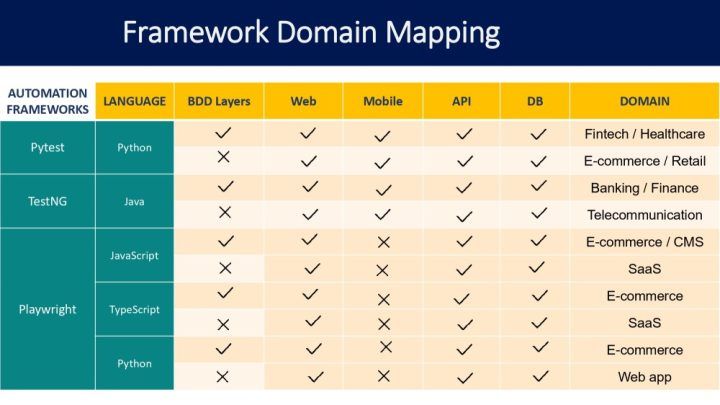
Our framework selection.
We combine proven frameworks like Pytest, TestNG, and Playwright with the right languages like Python, Java, JavaScript, and TypeScript to deliver scalable automation.
Our Team Brings Hands-On Experience With
- Selenium & Playwright for reliable cross-browser testing
- Cypress & Appium for fast web and mobile automation
- Postman & RestAssured for robust API validation
- Jenkins, GitHub Actions, and Azure DevOps for CI/CD integration
We ensure your automation pipeline runs continuously, providing fast feedback and stable builds.
Our automation experts don’t just build frameworks; they build strategies that scale with you.
From Identifying High-Value Test Cases to Measuring ROI, We Help You
- Cut regression time by up to 60%
- Improve test stability and reusability
- Integrate automation seamlessly into your DevOps flow
Explore our Automation Testing Services.
Let’s craft an automation approach that’s efficient today and future-ready for tomorrow
Conclusion
A strong strategy ties everything together, from defining the right scope and tools to tracking ROI and staying ahead with AI-driven, cloud-based solutions. It helps your QA team move beyond fixing failures to proactively improve software reliability.
The Takeaway
Automation success isn’t about how many scripts you run; it’s about how effectively those scripts deliver business value release after release.