

Technology Stack
 Python
 Pytest-BDD
  Selenium WebDriver
 1. Company Background
Company:GroBro.ai Industry: Education Technology Product Area: AI-powered learning and reading assessment
GroBro.ai is an education technology company focused on improving reading comprehension among young learners, particularly ESL learners. Its platform combines reading assessment, level-matched books, and measurable reading progress.
One of its core offerings is the GQ Test (GroQuotient Test), a reading comprehension assessment designed to evaluate how learners understand and interpret text.
As part of its move toward AI-powered learning experiences, GroBro introduced conversational functionality to support its user experience.
2. Business Problem
The QA team was responsible for testing the chatbot functionality integrated into the GroBro platform.
The main challenge was that chatbot responses could not always be validated using traditional exact-text comparison.
For example, if the expected response was:
"Sure, let's begin the Quick Exam."
the chatbot could potentially respond:
"Absolutely! Let's get started with the Quick Exam."
Although the wording is different, the intended meaning is similar.
A traditional automation assertion based on exact text would classify this as a failure.
Therefore, the testing team needed a method that could determine whether the chatbot's response was semantically similar to the expected response, rather than simply checking whether the words were identical.
3. Testing Objective
The objective of the testing initiative was to:
- Automate chatbot interaction.
- Validate predefined chatbot conversation scenarios.
- Capture actual chatbot responses.
- Compare expected and actual responses based on meaning.
- Reduce dependency on exact text matching.
- Establish a measurable semantic similarity threshold.
- Identify responses that were sufficiently different from the expected behavior.
4. Testing Approach
The team implemented a hybrid chatbot testing approach combining conventional UI automation with semantic AI evaluation.
The overall workflow was:
Open Chatbot → Send User Query → Capture Response → Generate Embeddings → Calculate Similarity → Compare Threshold → Pass/Fail
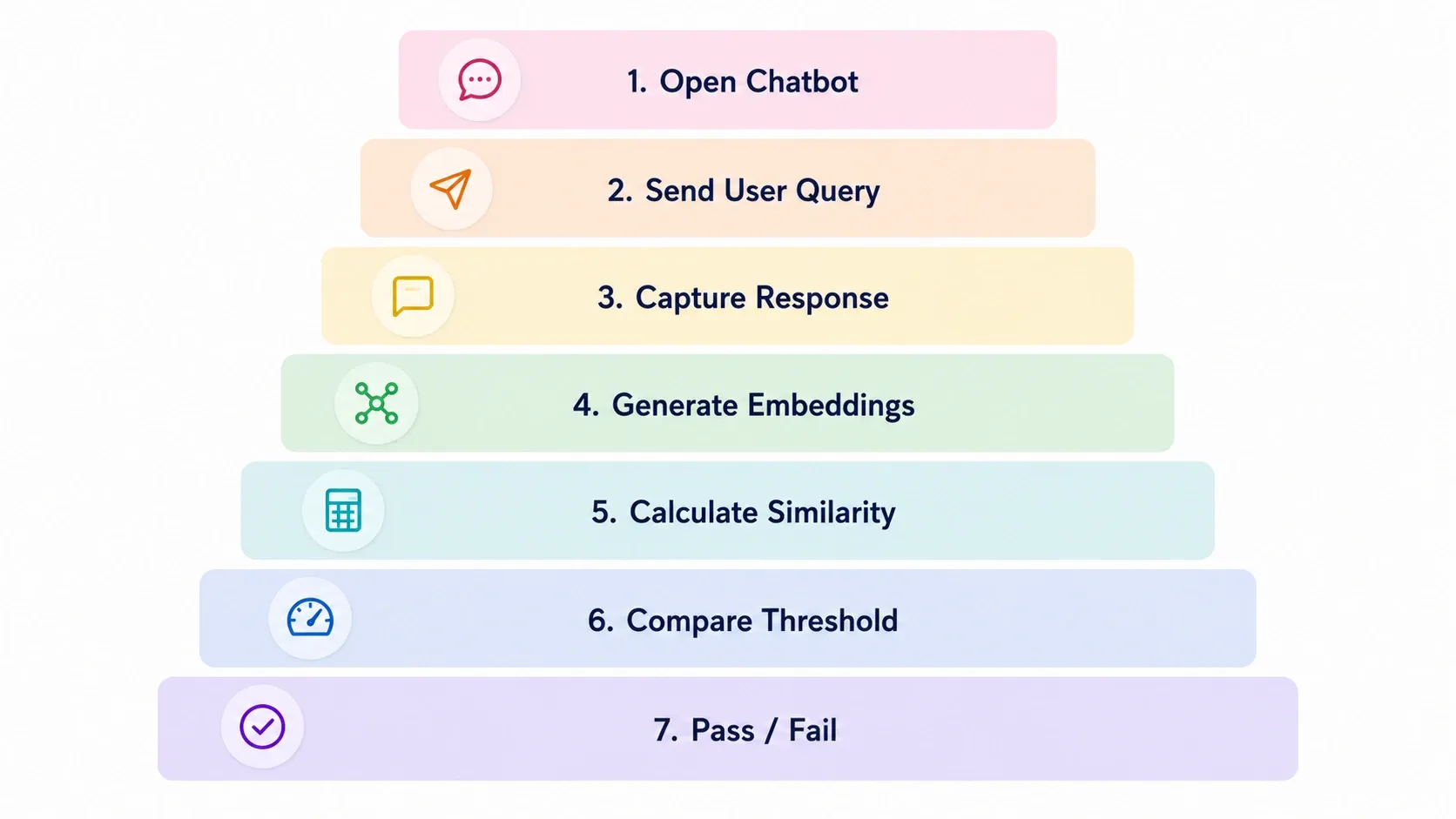
The testing presentation identifies two major approaches to chatbot validation:
Deterministic testing is effective when chatbot responses are predictable. However, dynamically generated responses may use different wording while maintaining the same meaning.
5. Test Automation Implementation
The test automation was implemented using Python, Selenium WebDriver, and Pytest-BDD.
The chatbot test scenario was defined using BDD steps.
Given The user opens the GroBro chatbot.
When The user says:
"I want to take a quick exam."
Then The chatbot should respond with:
"Sure, let's begin the Quick Exam."
The automation reads the conversation scenarios from a .convo file and sends the defined user messages to the chatbot.
The Selenium layer interacts with the chatbot interface by locating the chatbot input field, entering the message, submitting it, waiting for the chatbot response, and retrieving the latest response.
6. Semantic Response Validation
The key part of the implementation was the semantic validation layer.
Instead of comparing:
Expected Response = Actual Response
the automation converts both responses into embeddings.
The implementation uses:
Sentence Transformer: all-MiniLM-L6-v2
The expected response and actual response are converted into numerical vectors. Cosine similarity is then calculated between the two vectors.
The presentation explains embeddings as numerical representations of sentences that allow semantically similar sentences to be compared.
Validation Rule
The implemented threshold was:
The testing presentation documents the same 60% similarity threshold for semantic evaluation.
When the similarity score falls below the threshold, the automated test raises an assertion indicating that the chatbot response is too different from the expected response.
7. Example Test Case
The actual chatbot response is captured during execution and compared with the expected response using the Sentence Transformer model and cosine similarity.
This allows the test to accept legitimate variations in wording while still identifying responses that differ substantially from the expected meaning.
8. Why Exact Matching Was Not Sufficient
The testing team identified a fundamental limitation with exact response matching.
For example:
Expected:
"Hello! How can I help you?"
Actual:
"Hi there! How may I assist?"
An exact comparison would mark the test as failed.
However, the two responses convey essentially the same meaning.
The testing presentation specifically demonstrates this difference between text comparison and semantic comparison.
Semantic validation therefore provides a more suitable mechanism for evaluating dynamic chatbot responses.
The broader testing presentation also identifies Flask, Python Requests, Scikit-Learn, and embeddings.
9. Technology Stack
The broader testing presentation also identifies Flask, Python Requests, Scikit-Learn, and embeddings.
10. Test Execution Flow
The implemented testing process can be represented as follows:
Step 1 – Launch GroBro Chatbot The automation opens the chatbot through the web interface.
Step 2 – Execute Conversation The predefined user message is entered into the chatbot.
Step 3 – Capture Response The automation waits for the chatbot response and retrieves the latest response from the interface.
Step 4 – Generate Embeddings The expected and actual responses are converted into sentence embeddings.
Step 5 – Calculate Similarity Cosine similarity is calculated between the two embeddings.
Step 6 – Apply Threshold The resulting score is compared against the 0.60 threshold.
Step 7 – Determine Result A score of 0.60 or higher passes the semantic validation; a lower score results in a test failure.
The presentation describes the overall workflow as chatbot launch, test execution, semantic evaluation, and result review.
11. Key Testing Challenge and Solution
12. Outcome
The testing initiative demonstrated how conventional automation could be extended to evaluate dynamic chatbot responses.
Instead of treating every wording variation as a defect, the semantic testing layer evaluated whether the chatbot response remained sufficiently close in meaning to the expected response.
The approach therefore provided:
- Automated chatbot validation.
- Meaning-based response comparison.
- A measurable semantic acceptance threshold.
- Support for multiple valid response variations.
- Integration of AI-based evaluation into automated testing.
The presentation also identifies semantic testing as an approach that can handle multiple valid responses and can be incorporated into CI/CD pipelines.
13. Key Learning
The GroBro chatbot testing case demonstrates that testing AI-driven conversational systems requires a different validation strategy from conventional deterministic software.
For deterministic applications, an expected output can often be defined precisely.
For generative or dynamic chatbot responses, however, there may be several valid ways to communicate the same information.
Therefore, the QA process needs to evaluate not only:
"Did the chatbot return the expected words?"
but also:
"Did the chatbot communicate the expected meaning?"
The combination of UI automation and semantic evaluation provided a practical way to introduce this capability into the existing QA process.
14. Conclusion
The GroBro case demonstrates the transition from traditional chatbot automation toward semantic AI testing.
By combining Pytest-BDD and Selenium for automated interaction with Sentence Transformers and cosine similarity for meaning-based validation, the testing approach addressed a key limitation of exact-text assertions.
The resulting framework established a measurable method for evaluating dynamic chatbot responses while preserving the benefits of automated regression testing.
The case illustrates a broader principle for AI quality engineering: when software outputs become non-deterministic, testing must evolve from exact-output validation toward evaluating semantic correctness and acceptable response behavior.
What Our Client Says
“The semantic testing approach made our chatbot validation more reliable by evaluating meaning rather than just exact wording”
GroBro.ai Team