


Your e-commerce website is live. Marketing campaigns are running. Traffic is pouring in. Customers are browsing, adding products to their carts… and then suddenly, pages start loading more slowly. Checkouts fail. Payment time out. Within minutes, frustrated users leave, and many of them never come back.
This is how performance issues quietly kill conversions.
In e-commerce, speed has a direct impact on revenue and customer trust. Even a one-second delay can significantly reduce sales, especially during high-traffic periods such as flash sales or festive campaigns.
That's exactly why performance testing a website is so critical for e-commerce platforms. It helps you understand how your site behaves under real traffic, where it breaks under pressure, and what needs to be fixed before real customers feel the impact.
In this guide, you'll learn how to performance test an e-commerce platform, what to test, common mistakes to avoid, and proven strategies to keep your store fast, stable, and ready for peak traffic.
Why Performance Testing a Website Matters for E-Commerce
E-commerce websites face unique performance pressures that make performance testing essential:
Traffic Spikes
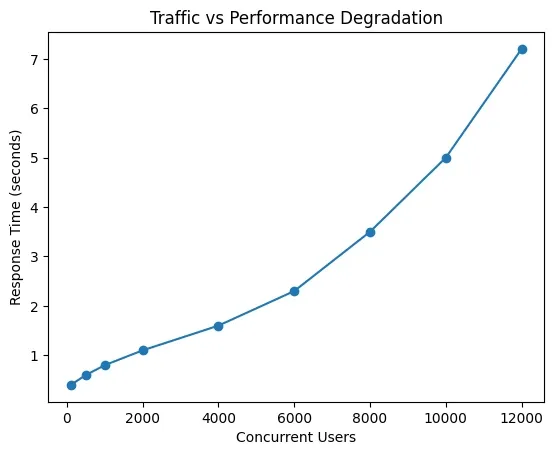
Flash sales, Black Friday, festive campaigns, and influencer promotions can suddenly increase traffic by 10x to 50x.

As concurrent users increase, response times remain stable only up to a certain capacity. Once the system crosses its performance threshold, response times degrade rapidly, leading to slow pages, failed checkouts, and lost revenue. Performance testing helps identify this breaking point before real users experience it.
Revenue at Risk
Every minute of downtime or slow checkout during peak hours directly translates to lost sales.
Customer Trust & Retention
Slow pages, failed payments, or crashes frustrate users and push them toward competitors.
SEO & Visibility
Google considers page speed and performance as ranking factors; slow websites lose organic traffic.
Performance testing a website helps you validate whether your platform can handle real-world demand before customers feel the impact.
Key Performance Metrics to Track During Performance Testing
When you do performance testing an e-commerce website, these metrics matter most:
Response Time
- APIs: Target under 200 ms
- Web pages: Target under 2 seconds
Concurrent Users
The maximum number of users actively browsing, adding items, and checking out at the same time.
Throughput
Requests per second (RPS) your system can handle without degradation.
Error Rate
Should stay below 0.1% under normal load and remain controlled under peak traffic.
Common Mistakes During Performance Testing a Website
Many teams run performance tests but still face production issues due to avoidable mistakes.
Testing in Isolation
Real users don't interact with a single page. Performance testing must cover complete user journeys across multiple systems.
Using Unrealistic Test Data
Small datasets won't expose database, cache, or search performance issues.
Ignoring Third-Party Dependencies
Payment gateways, shipping services, analytics tools, and recommendation engines often become bottlenecks under load.
Building an Effective Performance Testing Strategy for E-Commerce
A successful approach to performance testing a website starts with planning realistic scenarios that reflect actual customer behavior.
Core Performance Testing Scenarios
| Test Type | Purpose | Typical Load | When to Run |
|---|---|---|---|
| Baseline Load Test | Validate daily performance under normal traffic | 500–1,000 users | After every major release |
| Peak Load Test | Ensure stability during sales & campaigns | 5,000–10,000 users | Before flash sales / festivals |
| Stress Test | Identify system breaking point | 15,000–20,000+ users | Capacity planning |
| Soak Test | Detect memory leaks & degradation | Sustained normal–peak load | Pre-production |
| Spike Test | Validate sudden traffic surges | Instant 10x jump | Influencer campaigns |
1. Baseline Load Test
Establish normal operating conditions with typical user load (e.g., 1,000 concurrent users).
Duration: 30 minutes | Users: 1,000 | Ramp-up: 5 minutes
2. Peak Load Test
Simulates expected high-traffic events like sales campaigns.
Duration: 60 minutes | Users: 10,000 | Ramp-up: 10 minutes
3. Stress Test
Pushes the system beyond expected limits to identify breaking points.
Duration: 45 minutes | Users: 20,000+ | Ramp-up: 15 minutes
Tools Commonly Used for Performance Testing a Website
Popular tools for e-commerce performance testing include:
- Apache JMeter – Highly flexible, ideal for complex web and checkout flows
- Gatling – CI/CD-friendly with detailed performance insights
- k6 – Developer-focused, excellent for API-driven e-commerce platforms
- Baseline11 – A performance engineering platform that combines performance testing, monitoring, and insights to ensure e-commerce websites stay stable and fast under peak traffic
Worried About How Your Website Will Perform During Peak Traffic?
Our performance testing experts help e-commerce platforms identify bottlenecks, prevent downtime, and stay fast under real-world load.
Start Performance Testing Today
Choosing the right tool depends on your tech stack, test complexity, and automation needs.
Step-by-Step Guide: Performance Testing an E-Commerce Website
Here's a practical process to follow when performance testing a website:
1. Define Clear Success Criteria
Set benchmarks for response time, error rate, throughput, and resource utilization.
2. Create Realistic User Journeys
Simulate actual behavior such as:
Browse products → Search → Add to cart → Checkout → Payment → Order confirmation
3. Prepare a Production-Like Environment
Use realistic data volumes, caching rules, and third-party service behavior (or mocks).
4. Execute Performance Tests
Run baseline, peak, and stress tests while monitoring servers, databases, APIs, and third-party integrations.
5. Analyze, Optimize, and Retest
Fix bottlenecks, retest changes, and validate improvements before release.
Best Practices for Performance Testing a Website
- Start performance testing early, not just before major sales
- Automate tests and integrate them into CI/CD pipelines
- Combine synthetic performance tests with real user monitoring (RUM)
- Maintain detailed documentation for future campaigns and scaling
Real-World Example: E-Commerce Performance Testing for Black Friday
A mid-sized e-commerce platform with 50,000 daily users prepared for a Black Friday campaign expecting 10x traffic growth.
Before Optimization
Average response time: 3.2 seconds
After Performance Testing & Optimization
Average response time: 0.8 seconds
Outcome
The platform successfully handled 500,000 concurrent users, achieved 99.98% uptime, and improved performance by 75% during peak traffic.
Key Improvements Implemented
- Redis caching for sessions and product data
- Optimized database queries and indexing
- Auto-scaling for application servers
- CDN implementation for static assets
Conclusion
Performance testing a website is not a one-time task; it's an ongoing performance assurance process. For e-commerce platforms, it plays a crucial role in protecting revenue, maintaining customer trust, and ensuring smooth operations during traffic spikes.
By following the strategies outlined in this guide, you can confidently scale your e-commerce website and deliver fast, reliable experiences when it matters most.
Because in e-commerce, every second counts and every delay costs money.