


When users complaint that an application feels slow, the real challenge isn't fixing performance; it's proving whether performance is actually acceptable in the first place. Teams often run performance tests and collect metrics, but without a reference point, those numbers don't tell a complete story.
That's exactly where benchmark testing comes in.
Benchmark testing enables teams to evaluate their performance against fixed, meaningful reference points, rather than relying on assumptions or intuition. In 2026, when applications are cloud-based, traffic is unpredictable, and users are impatient, benchmark testing is no longer optional. It's a necessity.
What Is Benchmark Testing?
Benchmark testing is a type of performance testing that measures how an application, system, or website performs against predefined standards, historical baselines, or industry expectations.
In modern performance testing, these benchmarks are often aligned with widely accepted web performance best practices and performance standards for web applications, such as those defined by Google to reflect real user experience and measurable performance quality.
Instead of asking "How fast is my app?", benchmark testing answers:
- Is my app fast enough?
- Is it improving or getting worse over time?
- How does it perform under real-world conditions?
Benchmark testing gives teams context, not just metrics.
Why Benchmark Testing Matters
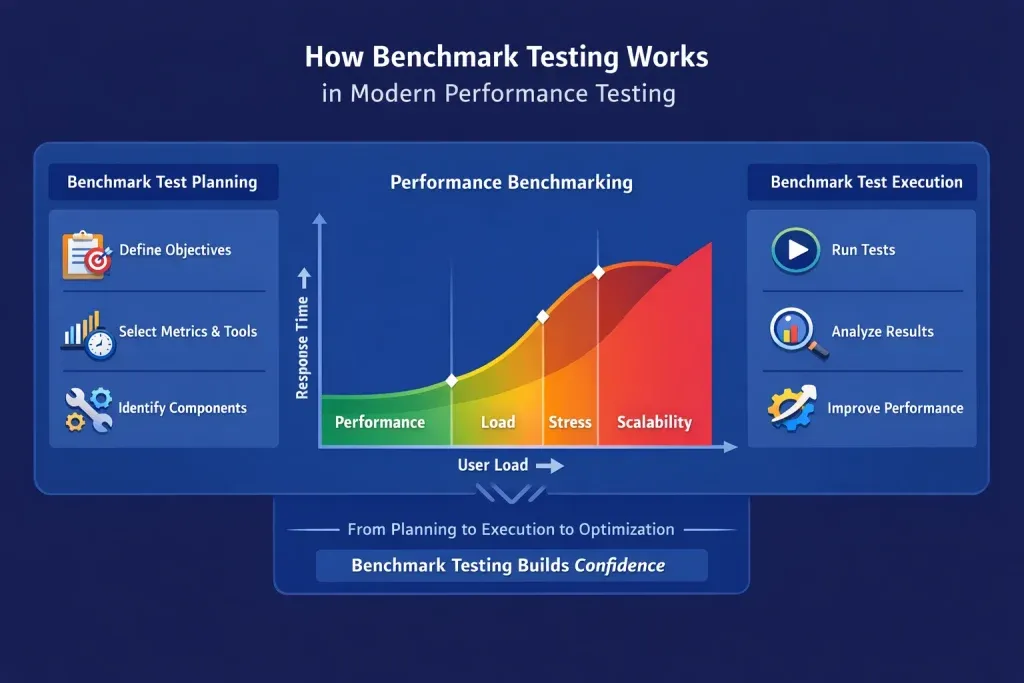
Performance issues don't usually appear overnight; they creep in gradually with new features, integrations, and traffic growth. Benchmark testing helps catch these issues early. 53% of mobile users abandon a website if it takes longer than 3 seconds to load
Key benefits include the following:
- Validating speed, stability, and reliability
- Identifying performance gaps before users notice
- Supporting confident go/no-go release decisions
- Aligning technical performance with business expectations
In short, benchmark testing prevents "surprise slowness" in production.
Benchmark Testing vs Performance Testing
These two terms are often used interchangeably, but they serve distinct purposes.
| Aspect | Benchmark Testing | Performance Testing |
|---|---|---|
| Objective | Compare performance against predefined standards or baselines | Evaluate system behavior under various load conditions |
| Scope | Specific metrics under controlled conditions | Broad, includes load, stress, endurance, and spike testing |
| Outcome | Establishes a performance baseline for comparison | Identifies bottlenecks and system capacity limits |
| Use Case | Setting performance goals, competitive analysis, release validation | Capacity planning and pre-deployment reliability checks |
| Duration | Typically conducted at specific stages of the test cycle | Ongoing throughout the development lifecycle |
Benchmark testing is a focused subset of performance testing. It helps answer:
"How do we compare?"
Performance testing helps answer:
"What happens when the system is under pressure?"
Key Metrics in Benchmark Testing
A benchmark test is only as useful as the metrics it measures. Here are the core ones:
For a complete breakdown of key metrics to measure in software performance testing, including how to interpret them, see our detailed guide.
| Metric | What It Measures | Target (Web Apps) |
|---|---|---|
| Response Time | Time from request to first byte or full response | < 200ms (API), < 2s (web page) |
| Throughput | Number of transactions processed per second | Depends on expected load |
| Latency | Delay between request and response | As low as possible |
| TTFB (Time to First Byte) | Server response speed | < 800ms |
| LCP (Largest Contentful Paint) | How quickly the main content loads | < 2.5 seconds |
| TTI (Time to Interactive) | When the page becomes fully usable | < 3.8 seconds |
| Error Rate | Percentage of failed transactions during the test | < 1% |
| CPU & Memory Utilization | Resource consumption under load | Varies by infrastructure |
Tracking these metrics over time, not just in a single test, is what turns raw data into actionable benchmark intelligence.
Key Aspects of Benchmark Testing
Modern benchmark testing goes beyond basic load testing. In 2026, it focuses on realistic, user-centric performance.
Performance Metrics
Measures response times, load times, throughput, and error rates across APIs, web apps, and mobile apps.
Scalability
Evaluates how well the system handles growing traffic, data volume, and concurrent users.
Cross-Platform Performance
Ensures consistent performance across browsers, devices, operating systems, and screen sizes.
Stress and Peak Load Behavior
Tests how the system behaves during traffic spikes, sales events, or unexpected surges.
Resource Utilization
Monitors CPU, memory, disk I/O, and network usage to uncover bottlenecks.
Real-World Conditions
Simulates actual user behavior, geographic distribution, and network variability.
Benchmark Comparison
Compare current results with past releases or industry standards to spot regressions or improvements.
User Experience Impact
Focuses on how performance affects real users, page responsiveness, interactivity, and perceived speed.
Examples of Benchmark Tests
Here are common benchmark tests used in modern performance testing:
1. Page Load Time Benchmark (Websites)
Measures how quickly pages load and become usable for users.
Metrics: TTFB, LCP, TTI, total load time
2. API Performance Benchmark (Web & Mobile Apps)
Evaluates API responsiveness under different loads.
Metrics: Response time, throughput, error rate
3. Mobile Performance Benchmark
Tests performance across real mobile devices and screen sizes.
Metrics: Load time, layout stability, interaction delays
4. Stress Benchmark
Pushes the system beyond normal limits to identify failure points.
Metrics: Stability, recovery time, resource saturation
5. Cross-Browser Benchmark
Ensures consistent performance across Chrome, Firefox, Safari, and Edge.
6. Database Benchmark
Measures query execution time and connection stability.
Metrics: Query latency, throughput
7. Load Benchmark
Simulates normal user traffic to validate day-to-day performance.
Types of Benchmark Testing
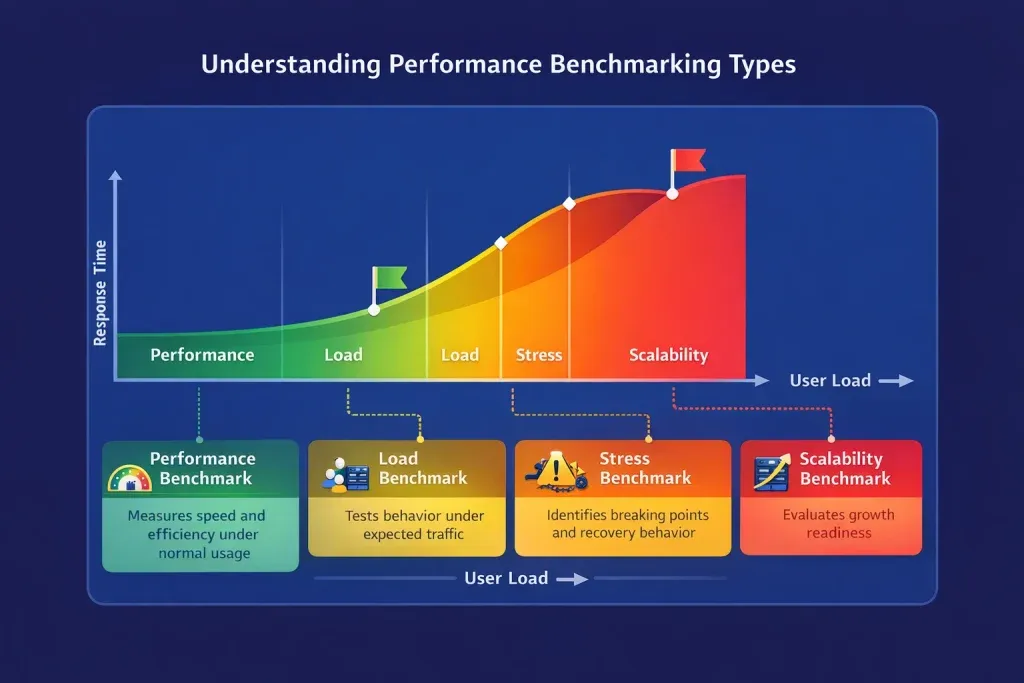
Different systems require different benchmarking approaches. Choosing the right type depends on what component you are testing and what conditions you are simulating.
System Benchmarking
Tests the entire system as a whole: hardware, software, and network working together. Useful for evaluating end-to-end performance before major releases or infrastructure changes.
Application Benchmarking
Focuses on web applications, APIs, mobile applications, and databases. The most common type for software teams, used to validate performance at the application layer before and after deployments.
Hardware Benchmarking
Measures raw hardware capability, CPU speed, memory throughput, GPU performance, and storage read/write speeds. Typically used when evaluating new infrastructure or cloud instance types.
Network Benchmarking
Evaluates LAN/WAN bandwidth, latency, and packet loss. Critical for applications that depend on fast or stable network communication, such as real-time applications or distributed systems.
Storage Benchmarking
Measures HDD/SSD read-write speeds and cloud storage throughput. Especially relevant for data-heavy applications with frequent file operations or large database workloads.
Database Benchmarking
Analyzes query execution time, transaction throughput, and connection stability under load. Essential for any application where database performance directly impacts response times.
Performance, Load, Stress, and Scalability Benchmarks
Beyond component types, teams also run benchmarks based on the conditions being simulated. Each serves a distinct purpose in performance evaluation.
For a deeper breakdown, read our guide on the difference between performance testing, load testing, and stress testing.
Performance Benchmarking
Measures speed and efficiency under normal, everyday usage. This establishes your baseline, the reference point every future test is compared against.
Load Benchmarking
Tests system behavior under expected peak traffic. Validates that the application can handle real-world demand without degradation during high-usage periods.
Stress Benchmarking
Pushes the system well past its normal limits to find breaking points and observe recovery behavior. Answers the question:
What happens when things go wrong?
Scalability Benchmarking
Evaluates whether the system can grow with increasing demand, more users, more data, and more concurrent operations. Critical for teams planning future growth or infrastructure scaling.
Not sure which type fits your use case? See our full breakdown of 8 types of performance testing.
Together, these four benchmark types provide a complete picture of application performance across all conditions, from routine usage to extreme failure scenarios.
When Should You Do Benchmark Testing?
Benchmark testing is useful at multiple stages:
- During development, to validate new features
- Before releases, to ensure performance stability
- After infrastructure changes or cloud migrations
- As part of ongoing performance monitoring
- When users report slowness or instability
In modern agile teams, benchmarking is continuous, not one-time.
Need Reliable Performance Benchmarks for Your Application?
We help teams establish realistic performance benchmarks, identify risks early, and release with confidence using proven performance testing strategies.
Get Started with Performance TestingCore Components of Benchmark Testing
A reliable benchmark test includes:
- Test environment – Production-like hardware, software, and network
- Test data – Realistic and consistent datasets
- Test plan – Objectives, scope, metrics, and assumptions
- Benchmarking tools – Load, performance, and monitoring tools
- Reports – Clear insights and optimization recommendations
How to Perform Benchmark Testing: A Step-by-Step Process
According to Gartner research, 29% of performance inconsistencies in benchmark tests come from improper test environments.
For a detailed comparison of performance testing tools, including pros, cons, and use cases, see our dedicated guide.
Step 1: Define Your Benchmark Goals
Before running any test, establish what you are measuring and why. Define:
- The specific component or system being tested
- The performance thresholds that represent acceptable outcomes
- The industry standards or historical baselines you are comparing against
Without clear goals, benchmark data is just noise.
Step 2: Select the Right Benchmark testing Tools
Tool selection depends on what you are testing. Common options include:
- Apache JMeter — Load and performance testing for web apps and APIs
- Google Lighthouse — Page performance benchmarking against Core Web Vitals
- Geekbench — CPU and hardware performance analysis
- SQLQueryStress — Database query performance benchmarking
- Wireshark — Network performance and latency analysis
- k6 — Modern developer-focused load testing and benchmarking
Step 3: Set Up a Controlled Testing Environment
Variations in the test environment are one of the leading causes of unreliable benchmark results. According to Gartner, 29% of performance inconsistencies in benchmark tests come from improper test environments.
Ensure your environment:
- Mirrors production infrastructure as closely as possible
- Runs with no background processes consuming resources
- Uses consistent hardware, OS versions, and network conditions across test runs
Step 4: Prepare Realistic Test Data
Use test data that reflects actual usage patterns, realistic user volumes, query types, file sizes, and geographic distribution. Artificial test data that doesn't mirror real behavior produces misleading benchmarks.
Step 5: Execute the Tests Consistently
Run each test multiple times and average the results to eliminate anomalies. Document:
- Exact conditions at the time of testing
- Tool versions and configuration settings
- Any deviations from the standard environment
Step 6: Analyze Results and Identify Bottlenecks
Look for patterns, not just individual data points. Common signals include:
- Response times that spike under load → possible database or backend bottleneck
- High memory utilization during peak traffic → memory leak or inefficient caching
- Error rate increases above baseline → stability issue under concurrent load
Compare results against your defined benchmarks and against previous test cycles.
Step 7: Optimize and Retest
Implement fixes based on findings, then rerun the same benchmark tests under identical conditions to confirm improvement. This is the only reliable way to validate that optimizations actually worked.
Interpreting Benchmark Test Results
Running the test is only half the work. How you read the results determines whether you make the right decisions.
1. Compare Against Standards, Not Just Your Own History
Your response time improving by 10% is good. But if the industry standard is twice as fast as you, you are still behind. Always benchmark against external reference points, not just internal progress.
2. Look for Trends, Not Snapshots
A single test result tells you where you are today. A series of results over multiple releases tells you whether you are improving, regressing, or stable.
3. Contextualize Against Real User Behavior
A system that performs well in a controlled test but degrades under real traffic patterns needs further investigation. Always cross-reference benchmark results with real-user monitoring (RUM) data where possible.
4. Set Clear Pass/Fail Thresholds
Before testing, define what acceptable looks like. For example:
"Page LCP must be under 2.5 seconds under 500 concurrent users."
Without a threshold, every result becomes debatable.
5. Retest After Every Significant Change
Code deployments, infrastructure changes, third-party integrations, and database migrations can all shift benchmark baselines. Make retesting a mandatory step in your release process.
Factors That Affect Benchmark Testing Results
Many variables can influence benchmark outcomes. Controlling for them improves accuracy significantly.
| Factor | Impact |
|---|---|
| Hardware Configuration | Processor speed, memory, and storage type directly affect results. |
| Network Conditions | Latency and bandwidth fluctuations can skew web and API benchmarks. |
| Background Processes | Competing resource usage during testing can distort metrics. |
| Software Versions | OS patches, driver updates, and framework changes can alter performance. |
| Test Data Volume | Small datasets may mask issues that only appear at scale. |
| Third-Party Integrations | External APIs and services can add unpredictable latency. |
| CDN Configuration | Caching and edge delivery significantly impact load time metrics. |
| Testing Methodology | Different tools measure performance differently; consistency matters. |
Challenges in Benchmark Testing
Benchmark testing provides valuable performance insights, but teams often encounter challenges that can affect accuracy, efficiency, and reliability. Understanding these challenges and their solutions helps ensure more effective benchmarking.
| Challenge | Solution |
|---|---|
| High Setup Time | Start with critical user journeys and automate repetitive test runs. |
| Cost and Infrastructure Needs | Use cloud-based testing platforms to scale on demand. |
| Unrealistic Test Scenarios | Use real devices, real networks, and real-world traffic patterns. |
| Over-Optimizing for Scores | Combine benchmark testing with real-user monitoring (RUM) to validate performance in production. |
| Inconsistent Environments | Use containerized or infrastructure-as-code (IaC) test environments for reproducibility. |
The most effective benchmark testing strategies focus on consistency, realistic test conditions, and continuous validation. Addressing these common challenges helps teams generate reliable benchmarks that support informed performance decisions.
Best Practices in Benchmark Testing
Following proven benchmark testing practices helps ensure accurate, reliable, and reproducible results.
1. Run Tests in Isolation
Eliminate background noise and unnecessary system activity to ensure accurate and consistent benchmark results.
2. Use Representative Test Data
Mirror real-world usage patterns as closely as possible to generate meaningful and actionable performance insights.
3. Run Each Test Multiple Times
Execute the same benchmark multiple times and average the results to reduce the impact of statistical outliers.
4. Track Trends Over Time
Single-point-in-time benchmarks are useful, but long-term performance trends provide deeper visibility into improvements, regressions, and stability.
5. Combine with Other Test Types
Benchmark testing alongside load testing, stress testing, and endurance testing provides a more complete understanding of system performance.
6. Update Benchmarks Regularly
Performance standards evolve over time. Review and update your benchmark baselines periodically to ensure they remain relevant.
7. Document Everything
Record the testing environment, tool versions, configurations, datasets, assumptions, and methodologies. Proper documentation ensures results are reproducible and easier to validate.
Benchmark testing delivers the most value when it is consistent, repeatable, and aligned with real-world usage. Following these best practices helps teams establish reliable performance baselines and make data-driven optimization decisions.
Benchmarking vs Benchmark Testing
| Aspect | Benchmarking | Benchmark Testing |
|---|---|---|
| Scope | Strategic & comparative | Technical & execution-focused |
| Focus | Best practices & standards | Performance metrics |
| Duration | Ongoing | Test-cycle based |
| Usage | Business & planning | QA & engineering |
The Role of AI in Benchmark Testing
AI is transforming how benchmark testing is conducted, analyzed, and acted upon. According to McKinsey, AI-driven performance testing can reduce benchmarking time by up to 40%.
Key Ways AI Is Changing Benchmark Testing
Automated Continuous Benchmarking
AI-powered tools can run benchmark tests automatically with every deployment, eliminating the need for manual intervention and enabling continuous performance validation.
Predictive Performance Analysis
Machine learning models analyze historical performance data to identify patterns and predict potential regressions before they impact users.
Adaptive Load Generation
AI dynamically adjusts test workloads based on real-world traffic patterns rather than relying on fixed test scenarios, resulting in more realistic benchmark results.
Intelligent Root Cause Analysis
Instead of manually reviewing logs and monitoring data, AI can correlate performance anomalies with specific code changes, infrastructure updates, or configuration modifications.
Optimization Recommendations
AI-powered systems provide actionable recommendations, including:
- Caching strategy improvements
- Database indexing optimizations
- Code-level performance enhancements
- Infrastructure tuning suggestions
Anomaly Detection
AI can automatically detect subtle performance degradations and unusual behavior that may be overlooked during manual analysis.
For cloud-based applications where workloads are highly dynamic, AI-driven benchmarking is rapidly becoming the standard. By combining automation, predictive analytics, and intelligent insights, organizations can identify performance issues faster and optimize systems more effectively.
Conclusion
Benchmark testing is not a one-time activity; it is an ongoing discipline that keeps applications performing at the level users and businesses depend on.
Throughout this guide, we covered what benchmark testing is, how it differs from performance testing, the types and metrics that matter, and the step-by-step process for doing it right. The common thread across all of it is this: you cannot improve what you do not measure against a standard.
The teams that treat benchmarking as a continuous practice, not just a pre-release checkbox, are the ones who catch regressions early, validate optimizations with confidence, and avoid the costly surprises that come with production slowdowns.
In 2026, with cloud-native architectures, unpredictable traffic, and users who abandon pages in under three seconds, performance is not just a technical concern. It is a business one.
Benchmark testing gives your team the evidence to act, not the anxiety of guessing.
It is not just about measuring performance. It is about maintaining performance confidence at scale.
Our Performance Testing Services
From baseline benchmarking to full-scale load simulations, we help you measure what matters and fix what's slowing you down.
Explore Performance Testing services→
API Testing
Benchmark your APIs under real-world conditions, testing response times, throughput, error rates, and concurrency at scale.
Explore API Testing services →
Test Automation
Stop running manual benchmark cycles. We build automated performance pipelines that benchmark every release, continuously. Explore Test Automation →